Loan repayment calculator in Excel
Work out your monthly payment, see in a full repayment schedule how much interest and capital you pay each month, and find out what a loan costs you over its whole term.
In five minutes you know what your loan costs per month, how much interest you pay in total and what a shorter term or an extra repayment saves you.
- Last updated:
- Published:
Available versions
FreeChoose the version that suits you. All versions are free.
Basic
Version 1.0 · last updated September 24, 2026One loan: monthly payment, full repayment schedule with interest and capital per month and the total interest cost.
Works with Excel 2016+, Microsoft 365, LibreOffice Calc
Download Basic (English, 9 kB)Also available in: Nederlands, Français
Extended
Version 1.0 · last updated September 24, 2026With early or extra repayments, a comparison of three terms and a chart of capital versus interest.
Works with Excel 2016+, Microsoft 365, LibreOffice Calc
Download Extended (English, 9 kB)Also available in: Nederlands, Français
Free · No account · No email
Prefer not to download? This tool also exists as an online calculator.
Open the online calculatorIn short
A loan repayment is the fixed monthly amount with which you pay back capital and interest; in an annuity loan that amount stays the same, but the share of interest falls each month while the share of capital rises.
Taking out a loan is one thing; knowing what it costs you every month and over the whole term is another. This Excel calculates your monthly payment, splits every month into interest and capital in a repayment schedule and shows what a shorter term, a lower rate or an extra repayment changes.
What does this tool do?
Almost every loan in Belgium, from an instalment loan for a car to a mortgage with capital repayment, works as an annuity: you pay the same amount every month. That amount consists of interest on the capital you still owe and a slice of repayment of that capital. Because the outstanding capital falls every month, the interest falls too and the capital share rises. At the start you mostly pay interest; at the end almost only capital.
Three things determine your monthly payment: the amount borrowed, the interest rate and the term. A longer term lowers the monthly payment but raises the total interest you pay, often by tens of thousands of euros on a home loan. Mind the difference between the nominal rate (the borrowing rate used to calculate interest) and the annual percentage rate or APR (JKP or TAEG in Belgium), which also includes file fees and mandatory insurance. The rate can be fixed for the whole term or variable, in which case it is revised at set dates based on a reference index.
The basic version calculates one loan with a full monthly repayment schedule and the total interest cost. The extended version lets you enter extra or early repayments and shows what they save, compares three terms side by side and draws a chart of capital versus interest. That helps you avoid the classic mistakes: looking only at the monthly payment, comparing one bank’s nominal rate with another’s APR, or underestimating the cost of a longer term.
Who is it for?
- Anyone considering a home loan, car loan or renovation loan who wants to know the monthly payment and total interest cost in advance.
- Households that want to try out different terms or amounts before approaching the bank.
- Self-employed people planning an investment loan who want to fit the repayments into their cashflow.
- Anyone with an existing loan who wants to know what an extra repayment or a refinancing saves in interest.
What is included?
- Input sheet with loan amount, term in months, nominal annual rate and start date, with a note next to every cell.
- Monthly payment, total amount repaid and total interest cost at a glance.
- Full monthly repayment schedule: interest, capital and outstanding balance after every payment.
- Extra or early repayments, one-off or monthly, with the interest saved and the shortened term (extended version).
- Comparison of three terms side by side: monthly payment, total interest and total repaid (extended version).
- Chart showing, year by year, how much of your payments goes to capital and how much to interest (extended version).
How do you use the file?
- 1
Open the file and go to the “Input” sheet. Only the yellow cells are meant to be filled in.
- 2
Enter the loan amount: the capital you actually draw down, so without your own contribution and without the costs you pay separately.
- 3
Enter the term in months (for example 240 for twenty years) and the nominal annual rate as it appears on your offer. Use the borrowing rate, not the APR.
- 4
Look at the “Overview” sheet: you immediately see the monthly payment, the total you repay and the total interest cost. Below it is the repayment schedule with interest, capital and balance per month.
- 5
In the extended version you also enter extra repayments on the “Input” sheet, one-off or monthly, and three terms you want to compare. The “Overview” sheet shows the interest saved and the shorter term.
- 6
Change the rate or the term to run scenarios and put the result next to your bank’s repayment schedule. Small differences are normal; large differences point to costs that are not in the nominal rate.
Worked example
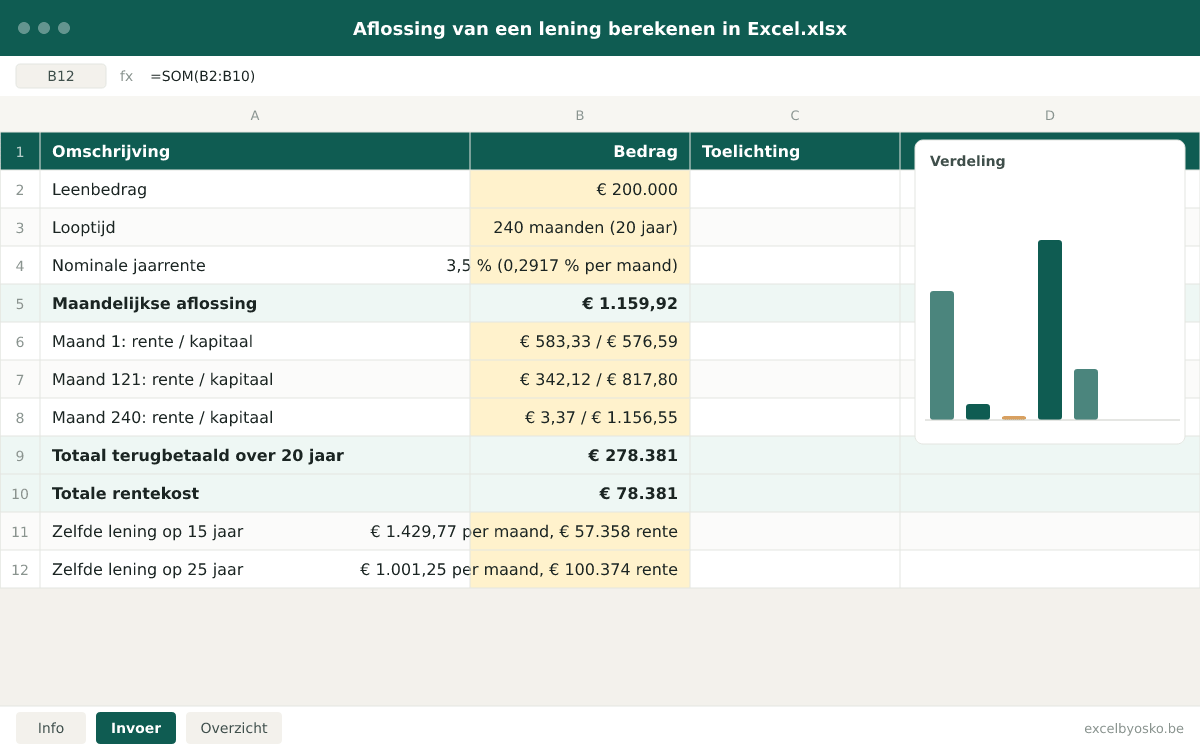
A loan of €200,000 over twenty years at a fixed nominal rate of 3.5%, repaid in 240 equal monthly instalments. The figures are rounded and serve only as an illustration.
| Loan amount | €200,000 |
|---|---|
| Term | 240 months (20 years) |
| Nominal annual rate | 3.5% (0.2917% per month) |
| Monthly payment | €1,159.92 |
| Month 1: interest / capital | €583.33 / €576.59 |
| Month 121: interest / capital | €342.12 / €817.80 |
| Month 240: interest / capital | €3.37 / €1,156.55 |
| Total repaid over 20 years | €278,381 |
| Total interest cost | €78,381 |
| Same loan over 15 years | €1,429.77 per month, €57,358 interest |
| Same loan over 25 years | €1,001.25 per month, €100,374 interest |
After ten years you have made 120 payments totalling €139,190, yet only €82,701 of the capital is repaid; the rest was interest. Borrowing for five years less costs €270 more per month but saves €21,023 in interest.
Sources & calculation method
This is how the calculation is built:
- The monthly rate is the nominal annual rate divided by twelve. The monthly payment follows from the annuity formula: capital × monthly rate ÷ (1 − (1 + monthly rate) to the power of minus the number of months). In Excel that is the PMT function.
- Each row of the repayment schedule calculates interest as outstanding balance × monthly rate. The capital share is the monthly payment minus that interest, and the new balance is the old balance minus the capital share. After the last month the balance is zero.
- The total repaid is the monthly payment × the number of months. The total interest cost is that total minus the capital borrowed, and equals the sum of the interest column.
- An extra repayment (extended version) is deducted from the balance in the month it is paid. The monthly payment stays the same, so the loan ends earlier; the file counts the interest and the months saved. Any early repayment indemnity is entered separately.
- The term comparison applies the same formula to three terms and puts monthly payment, total interest and total repaid side by side. The chart shows, year by year, the share of capital and interest in your payments.
Assumptions
- The file works with the nominal annual rate divided by twelve. Belgian lenders often use an actuarial annual rate, where the monthly rate is slightly lower; in the example that gives €1,154.28 instead of €1,159.92 per month. The difference is small, but it explains why your schedule may differ by a few euros from the bank’s.
- The rate stays fixed for the whole term. You simulate a variable rate by changing the rate and comparing the results; the file does not calculate revisions automatically.
- The first payment falls one month after the capital is drawn down and every payment is made at the end of the month.
- File fees, outstanding balance insurance and notary costs are not in the monthly payment. To compare offers with all their costs, use the loan comparison Excel.
Limitations
- The file is neither a credit offer nor financial advice; only the lender sets the final conditions.
- It only handles loans with fixed monthly capital repayment, not credit lines, bullet loans or loans with capital reconstitution.
- Tax benefits, such as a regional tax reduction for a home loan, are not calculated.
Sources
- FOD Economie – Kredietkosten (consumentenkrediet)
Used for: The difference between the borrowing rate and the APR, and which costs are and are not included in the APR.
Accessed: September 24, 2026
- FOD Economie – Vervroegde terugbetaling van een consumentenkrediet
Used for: The right to early repayment and the legal cap on the early repayment indemnity (1% or 0.5%) for consumer credit.
Accessed: September 24, 2026
- FOD Economie – Terugbetaling van een hypothecair krediet
Used for: How a loan with capital repayment works (interest on the outstanding balance) and the three-month-interest cap on the early repayment indemnity.
Accessed: September 24, 2026
- Wikifin (FSMA) – Hoe betaal je je lening of je krediet terug?
Used for: Independent explanation of repaying a loan in fixed monthly instalments.
Accessed: September 24, 2026
This page and the file were last updated on September 24, 2026. Legislation and rates may have changed since.
Frequently asked questions
How much can I borrow with my income?
The lender decides, based on your income, your fixed costs and your own contribution. Banks mainly look at the ratio between your monthly repayments and your net income; roughly one third is often quoted as a rule of thumb, but every bank sets its own limit. With this file you work backwards: pick a monthly payment you can carry comfortably, enter a rate and a term, and adjust the loan amount until you land on that payment. In the example, €1,160 per month at 3.5% over twenty years corresponds to €200,000.
What is the difference between the nominal rate and the APR?
The nominal or borrowing rate is the percentage the bank uses to calculate interest on your outstanding capital; that is the figure you enter in this file. The annual percentage rate (APR, called JKP or TAEG in Belgium) expresses the total cost of the credit as a yearly percentage, including file fees, administration fees and the cost of mandatory insurance. According to the FPS Economy all those costs sit in the APR, so you can compare loans regardless of amount and term. Always compare APR with APR, never one lender’s nominal rate with another’s APR.
How much interest will I pay in total on my loan?
Multiply your monthly payment by the number of months and subtract the capital borrowed. For €200,000 over twenty years at 3.5% that is 240 × €1,159.92 − €200,000 = €78,381. The same loan over fifteen years costs €57,358 in interest, over twenty-five years €100,374. The term therefore weighs more than many people think: borrowing five years longer costs almost €22,000 extra here, in exchange for a monthly payment that is €159 lower. Always work out the total interest, not just the monthly payment.
Is it worth repaying my loan early?
Usually yes, especially in the first years, because every extra euro comes straight off the capital and therefore no longer costs interest. In the example, €100 extra per month shortens the term by 26 months and saves €9,413 in interest. Do take the early repayment indemnity into account: for consumer credit it is legally capped at 1% of the capital repaid early (0.5% if less than a year remains), for a mortgage at three months of interest. Also compare the interest saved with what your savings would earn elsewhere.
Why do I mostly pay interest at the start and hardly any capital?
Because interest is calculated every month on the capital you still owe. In the first month of the example that is €200,000 × 3.5% ÷ 12 = €583.33 of interest; of the €1,159.92 payment, €576.59 is left for capital. Every month the balance drops a little, so the interest falls and the capital share rises. In the last month you pay just €3.37 of interest and €1,156.55 of capital. That is why an extra repayment has the most effect early on, and why refinancing near the end of the term is rarely worth it.
Osko Consult
Want more insight into your financial situation?
Osko Consult builds overviews, calculators and dashboards to order, also for small organisations and self-employed people. An Excel that does exactly what you need, instead of a template that almost fits.
Related tools
- Excel template
Loan comparison template in Excel
Put up to four loan offers side by side with amount, term, nominal rate, APR, monthly payment and all costs, and see at once which loan is cheapest over the whole term.
Individuals · Self-employed · SMEsFree - Excel templateOnline calculator
Car cost calculator in Excel
Work out what your car really costs per year, per month and per kilometre: depreciation, insurance, road tax, fuel or charging, maintenance and more.
Individuals · Self-employedFree - Excel template
Household budget template in Excel
Line up your income, fixed costs and variable spending month by month and see straight away how much is left to save, with a comparison between budget and actual.
IndividualsFree - Excel templateOnline calculator
Part-time work: what is left net? (Excel)
Compare your gross salary and an indicative net salary at 100, 90, 80, 60 and 50% and see the difference per month and per year, including the effect on holiday pay and the end-of-year bonus.
IndividualsFree