Loan comparison template in Excel
Put up to four loan offers side by side with amount, term, nominal rate, APR, monthly payment and all costs, and see at once which loan is cheapest over the whole term.
You see in one table which offer costs you the least, even when a lower monthly payment or lower file fees suggest otherwise.
- Last updated:
- Published:
Available versions
FreeChoose the version that suits you. All versions are free.
Basic
Version 1.0 · last updated September 24, 2026Up to four loan offers side by side: amount, term, nominal rate, APR, monthly payment, costs and total cost, with a ranking by total cost.
Works with Excel 2016+, Microsoft 365, LibreOffice Calc
Download Basic (English, 9 kB)Also available in: Nederlands, Français
Free · No account · No email
In short
A loan comparison puts offers with the same amount and the same term side by side and ranks them by total cost: the interest plus all one-off and recurring costs, as summarised by the APR.
Two offers for the same loan can look very different: one has a lower rate, the other lower file fees or cheaper insurance. This Excel puts up to four offers side by side, calculates the monthly payment and the total cost of each and ranks them, so you do not decide on the monthly payment alone.
What does this tool do?
Comparing loans fairly is only possible when you compare like with like: the same amount, the same term and every cost included. For each offer you enter the amount, the term, the nominal rate and the APR, plus one-off costs such as file fees and recurring costs such as outstanding balance insurance. The file calculates the monthly payment with the annuity formula, adds interest and costs into a total cost and ranks the offers from cheapest to most expensive.
The annual percentage rate or APR (JKP in Dutch, TAEG in French) is your main compass. In Belgium the APR must include every mandatory credit cost: besides the borrowing rate, also file fees, administration fees and the premiums of mandatory insurance. Two offers with the same nominal rate can therefore have a different APR, and for the same amount and term the offer with the lowest APR is also the cheapest. For consumer credit the FPS Economy also sets legal maximum APRs.
The term is the second trap. A longer term gives a lower monthly payment, but you pay interest for longer on a larger balance, so the total cost rises. People who look only at the monthly payment sometimes pick the most expensive loan. By putting every offer on the same term and comparing the total cost, you see at once what a lower monthly payment really costs you in the end.
Who is it for?
- Individuals who have received offers from several banks for a home loan, car loan or renovation loan.
- Anyone who has consulted a credit broker or comparison site and wants to check the proposals themselves.
- Self-employed people and SMEs that have approached several banks for an investment loan and want to compare the total cost.
- Anyone who wants to refinance an existing loan and wants to know whether the new proposal is really cheaper after costs.
What is included?
- Input sheet for up to four offers side by side: amount, term, nominal rate and APR as they appear in the offer.
- Lines for one-off costs (file fees, valuation fees, notary costs for a mortgage) and recurring costs (outstanding balance insurance, fire insurance).
- Automatic calculation of the monthly payment per offer with the annuity formula.
- Total cost per offer: interest over the whole term plus all costs, and the total you actually repay.
- Ranking of the offers by total cost, with the difference in euros against the cheapest.
- A note next to every input cell, with where to find the figure in the offer, the SECCI form or the ESIS document.
How do you use the file?
- 1
Open the file and go to the “Input” sheet. Each column is one offer; you fill in only the yellow cells.
- 2
Enter the same loan amount and the same term in months for every offer. If they differ, ask the lender for an adjusted offer; otherwise the comparison is skewed.
- 3
Copy the nominal rate (borrowing rate) and the APR from the offer. For consumer credit they are on the SECCI form; for a mortgage they are on the ESIS document.
- 4
Enter the one-off costs: file fees, valuation fees and, for a mortgage, the notary and registration costs of the credit deed. Then enter the annual premium of the mandatory insurance.
- 5
Look at the “Overview” sheet: for each offer it shows the monthly payment, total interest, total cost and the ranking. The cheapest offer is at the top, with the difference in euros against the others.
- 6
Test scenarios: shorten the term of the most expensive offer, for example, or ask for an offer without bundled insurance and compare again.
Worked example
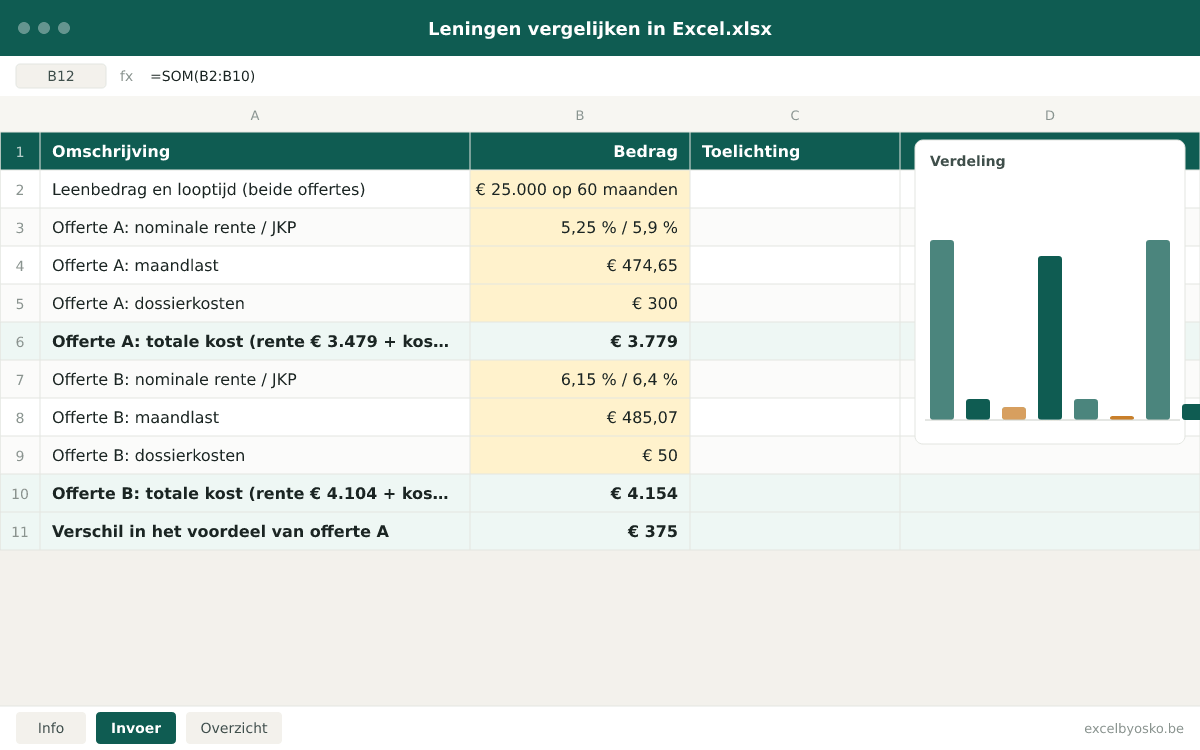
Two offers for a loan of €25,000 over 60 months. Offer A has a lower rate but higher file fees; offer B tempts with low file fees. The figures are rounded and serve only as an illustration.
| Amount and term (both offers) | €25,000 over 60 months |
|---|---|
| Offer A: nominal rate / APR | 5.25% / 5.9% |
| Offer A: monthly payment | €474.65 |
| Offer A: file fees | €300 |
| Offer A: total cost (interest €3,479 + fees €300) | €3,779 |
| Offer B: nominal rate / APR | 6.15% / 6.4% |
| Offer B: monthly payment | €485.07 |
| Offer B: file fees | €50 |
| Offer B: total cost (interest €4,104 + fees €50) | €4,154 |
| Difference in favour of offer A | €375 |
Offer B looks attractive because of its low file fees, but the higher rate costs €10.42 more per month, or €625 over the term. That easily outweighs the €250 you save on file fees. The APR said so already: 5.9% is cheaper than 6.4%.
Sources & calculation method
This is how the calculation is built:
- The monthly payment of each offer is calculated with the annuity formula: amount × monthly rate ÷ (1 − (1 + monthly rate) to the power of minus the number of months), with monthly rate = nominal annual rate ÷ 12. In Excel that is the PMT function.
- Total interest is the monthly payment × the number of months minus the amount borrowed.
- The total cost is total interest plus one-off costs plus recurring costs over the whole term (annual premium × number of years). The total repaid is the amount borrowed plus that total cost.
- The offers are ranked from lowest to highest total cost. For each offer the file shows the difference in euros with the cheapest, per month and over the whole term.
- The APR is not recalculated but taken from the offer; the legal calculation uses an actuarial formula with all mandatory costs. The file shows it next to your own total cost as a check: for the same amount and term, the lowest APR goes with the lowest total cost.
Assumptions
- A fair comparison assumes the same loan amount and the same term for every offer. The ranking is only meaningful when those two are equal.
- The rate stays fixed for the whole term. An offer with a variable rate is compared on its starting rate; possible revisions are not in the calculation.
- The costs you enter are those from the offer or from the SECCI or ESIS document. Insurance premiums are treated as constant per year, even though some outstanding balance insurance premiums fall along with the balance.
- The file works with the nominal annual rate divided by twelve. Lenders that use an actuarial rate arrive at a slightly lower monthly payment; the difference is small and applies to every offer in the same way.
Limitations
- The file is neither a credit offer nor advice; whether you get the loan and on what conditions is decided by the lender alone.
- The total cost is a simple sum; it does not account for when you pay the costs or for what you could do with the money saved in the meantime.
- Credit lines, bullet loans and loans with capital reconstitution have a different structure and fall outside this file.
Sources
- FOD Economie – Kredietkosten (consumentenkrediet)
Used for: Which costs are included in the APR (file fees, administration fees, mandatory insurance) and which are not, and the free choice of insurer.
Accessed: September 24, 2026
- FOD Economie – Maximale tarieven voor consumentenkrediet
Used for: The legal maximum APRs per credit type and amount, their six-monthly revision and the consequence of exceeding them.
Accessed: September 24, 2026
- FOD Economie – Aanvullende diensten en koppelverkoop bij hypothecair krediet
Used for: Outstanding balance and fire insurance as ancillary services to a home loan, the ban on tying and the freedom to switch insurer.
Accessed: September 24, 2026
- Notaris.be – De koop- en kredietkosten
Used for: The mortgage registration and credit deed costs that come on top of the interest on a mortgage loan.
Accessed: September 24, 2026
This page and the file were last updated on September 24, 2026. Legislation and rates may have changed since.
Frequently asked questions
How do I compare two loans fairly?
First make sure the amount and the term are identical; otherwise ask for an adjusted offer. Then compare the APR, not the nominal rate, because only the APR includes file fees and mandatory insurance. Finally look at the total cost: interest over the whole term plus all costs. An offer with a lower monthly payment but a longer term is almost always more expensive in total. This file performs those three steps automatically for up to four offers and shows the difference in euros against the cheapest.
What is the APR and why does it matter more than the rate?
The annual percentage rate (APR, JKP or TAEG in Belgium) expresses the total cost of a loan as a percentage per year. According to the FPS Economy it includes, besides the borrowing rate, file fees, administration fees and the cost of mandatory insurance. The cost of optional insurance, late payment interest and the early repayment indemnity are not part of it. Because every lender has to calculate the APR with the same legal formula, you can use it to compare offers regardless of amount and term. The nominal rate alone tells only part of the story.
Is there a legal maximum on the rate of a loan?
For consumer credit, yes. The FPS Economy sets maximum APRs that depend on the type of credit and the amount, and that can change every six months. On 1 December 2025, for example, the maximum for an instalment loan above €5,000 was 12.00%; for small amounts and credit lines the maxima are higher. If the APR of your loan exceeds the legal maximum, you are entitled to a full waiver of the credit costs charged. For mortgages no such table exists. Always check the current table on the FPS Economy website.
Is a loan with a lower monthly payment always cheaper?
No. A lower monthly payment often comes from a longer term, and then you pay interest for longer on a larger outstanding balance. Take €25,000 at 5.25%: over 48 months you pay €578.57 per month and €2,771 in interest, over 60 months €474.65 per month and €3,479 in interest, over 72 months €405.53 per month but already €4,198 in interest. So always compare offers on the same term, and only then choose the term that fits your budget. A lower monthly payment is comfort, not a discount.
Do I need outstanding balance insurance with my loan?
The law does not require it, but for a mortgage the lender usually makes it a condition. You are always free to choose the insurer yourself, even when the insurance is mandatory, and since 1 June 2024 you can more easily move such ancillary services to another provider without your rate going up. If the insurance is a condition of the loan, its cost belongs in the APR. So enter the premium for every offer, so that a low rate with expensive mandatory insurance does not win unfairly.
Osko Consult
Want more insight into your financial situation?
Osko Consult builds overviews, calculators and dashboards to order, also for small organisations and self-employed people. An Excel that does exactly what you need, instead of a template that almost fits.
Related tools
- Excel templateOnline calculator
Loan repayment calculator in Excel
Work out your monthly payment, see in a full repayment schedule how much interest and capital you pay each month, and find out what a loan costs you over its whole term.
Individuals · Self-employedFree - Excel templateOnline calculator
Car cost calculator in Excel
Work out what your car really costs per year, per month and per kilometre: depreciation, insurance, road tax, fuel or charging, maintenance and more.
Individuals · Self-employedFree - Excel template
Financial plan template in Excel
Draw up a three-year financial plan: revenue, costs, result, cashflow and break-even revenue, with investments, financing and a balance sheet per year in the extended version.
Self-employed · SMEsFree