Household budget template in Excel
Line up your income, fixed costs and variable spending month by month and see straight away how much is left to save, with a comparison between budget and actual.
After one evening of filling it in, you know exactly where your money goes each month and how much you can put aside.
- Last updated:
- Published:
Available versions
FreeChoose the version that suits you. All versions are free.
Basic
Version 1.0 · last updated September 24, 2026Monthly budget with income, fixed costs, variable costs and room to save, with the difference between budget and actual.
Works with Excel 2016+, Microsoft 365, LibreOffice Calc
Download Basic (English, 9 kB)Also available in: Nederlands, Français
Extended
Version 1.0 · last updated September 24, 2026Twelve months with a yearly overview, savings goals, a chart per category and a buffer for unexpected costs.
Works with Excel 2016+, Microsoft 365, LibreOffice Calc
Download Extended (English, 9 kB)Also available in: Nederlands, Français
Free · No account · No email
In short
A household budget is a monthly overview of all the income and expenses of a household, showing how much is left over to save or to absorb unexpected costs.
Many households know what comes in, but not what goes out. Small subscriptions, yearly bills and groceries that cost a little more every week mean less is left at the end of the month than expected. This Excel puts everything on one sheet and shows the gap between what you planned and what you actually spent.
What does this tool do?
On the “Input” sheet you enter the household’s net income: salaries, child benefit (the Groeipakket in Flanders), any allowances and other income. Below that come the expenses, split into fixed costs that return every month (rent or mortgage, energy, insurance, internet, subscriptions, school and childcare) and variable spending you steer yourself (groceries, transport, clothing, leisure). Housing weighs heaviest: according to Statbel, a third of a Belgian household’s budget went to housing on average in 2024.
Yearly costs such as road tax, property tax (onroerende voorheffing), fire insurance or the summer holiday are entered once a year; the file spreads them automatically over twelve months. That removes the surprise of the one expensive month and tells you what to set aside every month.
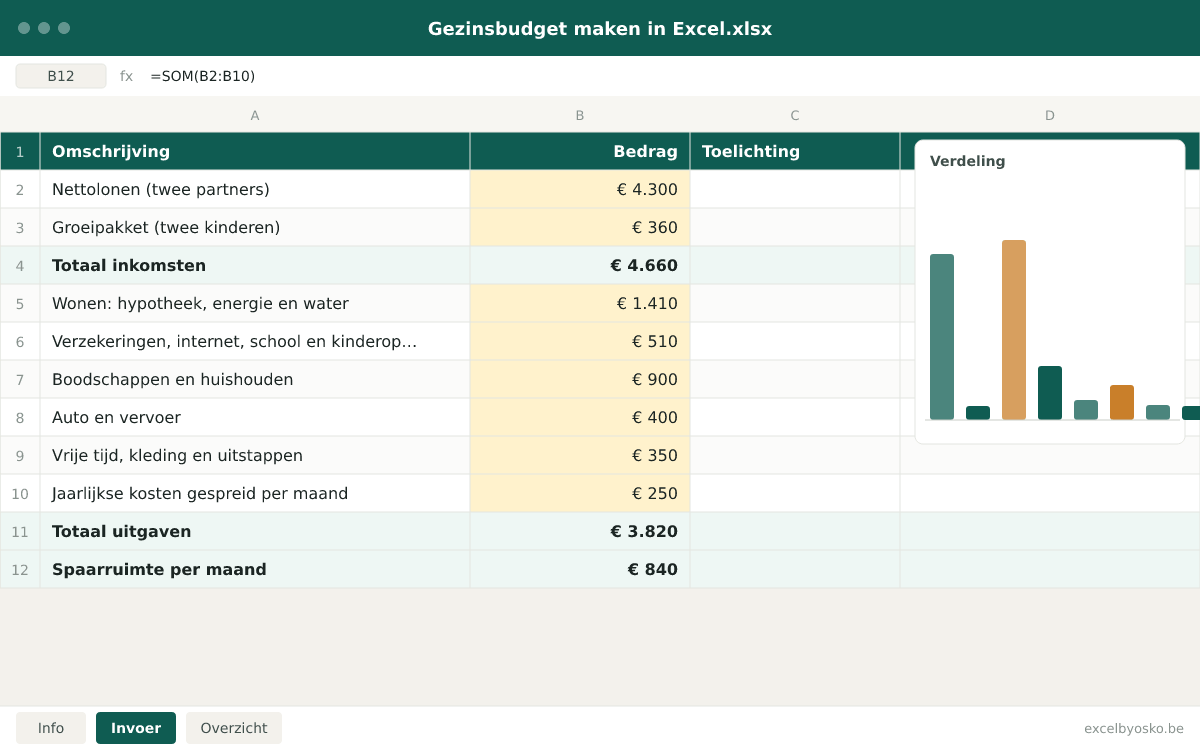
The “Overview” sheet shows per category what you budgeted, what you actually spent and the difference. At the bottom is the room to save: what is left after all costs are paid. The extended version tracks twelve months, adds them up into a yearly overview, lets you set savings goals and shows a chart of spending per category.
Who is it for?
- Families with children who want to know how much is left after fixed costs for saving and leisure.
- Couples who have just moved in together or bought a home and want to map their new cost structure.
- Single people making ends meet who want to see which expenses they can adjust.
- Anyone building an emergency fund or saving for a big goal such as a renovation, a car or the children’s studies.
What is included?
- Input sheet with net income (salaries, child benefit, other income) and expenses per category.
- Fixed costs, variable costs and yearly costs kept separate, with automatic spreading of yearly amounts over twelve months.
- Budget and actual columns, so you see month after month where you deviate.
- Calculation of your room to save and of the percentage of income you put aside.
- Twelve monthly sheets, a yearly overview, savings goals and a chart per category (extended version).
- Buffer calculator showing how many months your savings cover in case of unexpected costs or loss of income (extended version).
How do you use the file?
- 1
Open the file and go to the “Input” sheet. Only the yellow cells are meant to be filled in.
- 2
Enter net income as it lands on your account: each partner’s net salary, child benefit and other fixed income. Leave holiday pay and the end-of-year bonus out of the monthly budget; treat them separately as extras.
- 3
Fill in the fixed costs from your bank statements of the last three months: mortgage or rent, energy advance, water, insurance, internet and phone, subscriptions, school and childcare.
- 4
Estimate the variable spending: groceries, fuel or public transport, clothing, outings and gifts. Look at what you spent in recent months rather than what you would like to spend.
- 5
Enter yearly costs as a yearly amount: road tax, property tax, holidays, membership fees. The file converts them into a monthly amount to set aside.
- 6
Look at the “Overview” sheet: it shows the room to save, the difference between budget and actual per category and the chart. At the end of each month, enter the actual amounts and adjust where needed.
Worked example
A couple with two children who own their home. The amounts are rounded, the child benefit is an example amount and everything serves only as an illustration.
| Net salaries (two partners) | €4,300 |
|---|---|
| Child benefit (two children) | €360 |
| Total income | €4,660 |
| Housing: mortgage, energy and water | €1,410 |
| Insurance, internet, school and childcare | €510 |
| Groceries and household | €900 |
| Car and transport | €400 |
| Leisure, clothing and outings | €350 |
| Yearly costs spread per month | €250 |
| Total expenses | €3,820 |
| Room to save per month | €840 |
The yearly costs (here €3,000: road tax, property tax and holidays) are divided by twelve. This household puts about 18% of its income aside; an emergency fund of three to six net monthly salaries comes to roughly €13,000 to €26,000 here.
Sources & calculation method
This is how the calculation is built:
- Income is entered net, as it lands on the account. Gross income, withholding tax and social security contributions are deliberately left out; the budget starts from what you actually receive.
- Fixed and variable costs are entered per month and added up per category. Yearly costs are divided by twelve and added to the fixed costs as a monthly reservation.
- Room to save = total net income − total expenses (including the monthly reservation for yearly costs). The savings rate is the room to save divided by total income.
- The difference between budget and actual is calculated per category as actual − budget; a positive difference means you spent more than planned.
- In the extended version the twelve monthly sheets are added up into a yearly overview and the buffer is expressed in months: savings balance divided by average monthly expenses.
Assumptions
- Child benefit differs per region, per child and per family situation. The file uses the amount you enter; the correct amount is on your payment statement.
- Energy and water costs are advances; the yearly settlement can differ. Put a margin in the yearly costs if you expect to pay extra.
- Property tax and road tax depend on your region and on your home or car. Take the amount from your last assessment notice.
- Holiday pay and the end-of-year bonus stay outside the monthly budget. If you want to include them anyway, divide them by twelve and add them to income.
Limitations
- The file is not bookkeeping software and does not link automatically to your bank account; you enter the actual amounts yourself.
- It gives no tax or financial advice and does not calculate taxes, loans or returns on savings.
- The categories are fixed in the basic version; in the extended version you can adapt them to a limited extent without breaking the formulas.
Sources
- Wikifin (FSMA) – Hoe maak je een budget?
Used for: Which income and expenses to gather before drawing up a budget, and how to act on the result.
Accessed: September 24, 2026
- Wikifin (FSMA) – Wat is een spaarbuffer?
Used for: What an emergency fund is for and the rule of thumb of three to six net monthly salaries that is often considered ideal.
Accessed: September 24, 2026
- Statbel – Huishoudbudget
Used for: The spending structure of Belgian households from the household budget survey: in 2024, on average a third of the budget went to housing and 14% to food.
Accessed: September 24, 2026
- Vlaanderen.be – Vlaams Groeipakket
Used for: The Groeipakket, the Flemish child benefit: every child automatically receives a monthly base amount, possibly topped up with supplements.
Accessed: September 24, 2026
This page and the file were last updated on September 24, 2026. Legislation and rates may have changed since.
Frequently asked questions
How much should a family save per month?
There is no legal or official figure. A common rule of thumb is to put 10 to 20% of net income aside, but what is achievable depends on your housing cost and family situation. More important than the percentage is regularity: a fixed amount that goes automatically to a savings account on the day the salary arrives. The budget shows you which amount is realistic without going into the red every month.
How big should my emergency fund be?
Wikifin, the website of the Belgian financial regulator FSMA, notes that a buffer of three to six net monthly salaries is often considered ideal. If you own your home, have dependent children or work as a self-employed person, aim for the upper end. The buffer is only for unexpected costs such as a broken boiler or a period without income; planned expenses such as a holiday are saved separately. Keep it on a savings account you can access immediately.
What is the difference between fixed and variable costs?
Fixed costs return every month with an amount you know in advance: rent or mortgage, energy advance, insurance, internet, subscriptions, childcare. You can lower them, but usually only after a notice period or by switching provider. Variable costs fluctuate and you steer them from week to week: groceries, fuel, clothing, outings. When there is a shortfall you look at variable costs first because they react fastest, but the biggest gain often lies in renegotiating fixed costs.
How do I include yearly costs in a monthly budget?
Add up every cost that falls once a year: road tax, property tax, fire insurance if you pay it yearly, membership fees, holidays and the energy settlement. Divide that total by twelve and set that amount aside every month on a separate account. In the example it is €3,000 per year, so €250 per month. That way you pay those bills from the reserve instead of from the monthly budget or the emergency fund.
Should I count child benefit as income?
Yes, because it is money that arrives on your account every month and helps carry the cost of the children. In Flanders it is called the Groeipakket; in Wallonia and Brussels it is child benefit (allocations familiales) paid by a fund such as FamiWal or Famiris. Each child receives a monthly base amount that can be topped up with supplements depending on family situation and income. Take the amount from your last payment; in the example, €360 for two children is an illustrative amount.
Osko Consult
Want more insight into your financial situation?
Osko Consult builds overviews, calculators and dashboards to order, also for small organisations and self-employed people. An Excel that does exactly what you need, instead of a template that almost fits.
Related tools
- Excel templateOnline calculator
Car cost calculator in Excel
Work out what your car really costs per year, per month and per kilometre: depreciation, insurance, road tax, fuel or charging, maintenance and more.
Individuals · Self-employedFree - Excel templateOnline calculator
Loan repayment calculator in Excel
Work out your monthly payment, see in a full repayment schedule how much interest and capital you pay each month, and find out what a loan costs you over its whole term.
Individuals · Self-employedFree - Excel templateOnline calculator
Part-time work: what is left net? (Excel)
Compare your gross salary and an indicative net salary at 100, 90, 80, 60 and 50% and see the difference per month and per year, including the effect on holiday pay and the end-of-year bonus.
IndividualsFree