Financial plan template in Excel
Draw up a three-year financial plan: revenue, costs, result, cashflow and break-even revenue, with investments, financing and a balance sheet per year in the extended version.
You get in one file the figures the notary, the bank and you yourself need to see whether your plan holds up.
- Last updated:
- Published:
Available versions
FreeChoose the version that suits you. All versions are free.
Basic
Version 1.0 · last updated September 24, 2026Three years: revenue and costs per month in year 1 and per year after that, income statement, cashflow and break-even revenue.
Works with Excel 2016+, Microsoft 365, LibreOffice Calc
Download Basic (English, 9 kB)Also available in: Nederlands, Français
Extended
Version 1.0 · last updated September 24, 2026Plus investments and depreciation, financing with own contribution and a loan with repayment schedule, opening balance sheet and balance sheet per year, VAT effect on cash and ratios.
Works with Excel 2016+, Microsoft 365, LibreOffice Calc
Download Extended (English, 9 kB)Also available in: Nederlands, Français
Free · No account · No email
In short
A financial plan is the translation of your business plan into figures over at least two to three years: which investments you make, how you finance them, what revenue and costs you expect and whether there is enough money in the bank every month.
Anyone incorporating a bv, nv or cv has to hand a financial plan to the notary before incorporation. Anyone applying for a loan gets the same question from the bank. But above all: it is the first time you write your idea out fully in figures and see whether it stands up. This Excel guides you step by step through revenue, costs, investments, financing and cashflow.
What does this tool do?
The file follows the structure the law prescribes for a bv and that banks recognise: an investment budget (what you need to start), a financing plan (where that money comes from: own contribution, loan, suppliers), an operating budget (expected revenue and costs, leading to an income statement) and a liquidity plan (cashflow per month). For a bv the plan has to cover at least two years; the file calculates three years, with year 1 per month.
You estimate revenue bottom-up: number of customers or assignments per month times average price, or billable hours times hourly rate, with a ramp-up curve in the first months. The file splits costs into variable costs (which move with revenue, such as raw materials or subcontracting) and fixed costs (rent, insurance, software, accountant, depreciation and your own remuneration). From that follows the break-even revenue: the revenue at which you exactly cover your costs.
The extended version adds an investment table with depreciation, a loan with repayment schedule, an opening balance sheet and a balance sheet at the end of each year, the VAT effect on cashflow and a set of ratios such as solvency and liquidity. The file thus delivers the projected balance sheet and income statement after twelve and twenty-four months that the Code of Companies and Associations requires for a bv.
Who is it for?
- Start-ups incorporating a bv, nv or cv who have to draw up the mandatory financial plan for the notary.
- Self-employed people and SMEs applying for an investment loan or overdraft who want to present the bank with a substantiated plan.
- Anyone unsure whether an idea is financially viable and wanting to know what revenue is needed to break even and pay themselves a salary.
- Existing businesses planning a new activity, location or major investment and wanting to see the impact on result and cash.
What is included?
- Input sheet with revenue assumptions per month for year 1 and per year for years 2 and 3, and a cost list split into variable and fixed.
- Income statement per year: revenue, variable costs, gross margin, fixed costs, depreciation, remuneration and result before tax.
- Cashflow table per month for year 1 and per year after that, with opening balance, receipts, payments and closing balance.
- Automatic break-even revenue per year and per month, with a chart of revenue against costs.
- Investment table with depreciation, financing plan with own contribution and loan with repayment schedule (extended version).
- Opening balance sheet and balance sheet per year, VAT effect on cashflow and ratios such as solvency, liquidity and profitability (extended version).
How do you use the file?
- 1
Open the file and go to the “Input” sheet. Enter the start date, the legal form and the VAT rhythm. Only the yellow cells are meant to be filled in.
- 2
Build your revenue bottom-up: number of customers, assignments or hours per month times your price. Be cautious in the first months; a new business rarely runs at full speed from month one.
- 3
Enter the variable costs as a percentage of revenue or as an amount per unit: raw materials, goods for resale, subcontractors, transaction fees.
- 4
Enter the fixed costs per month: rent, insurance, accountant, software, telephony, marketing and your own remuneration or social contributions. Do not forget the costs you only pay once a year.
- 5
In the extended version, enter the investments with their depreciation period, the own contribution and the loan with its term and interest rate. The file builds the repayment schedule and the balance sheet.
- 6
Look at the “Overview” sheet: income statement, cashflow, break-even revenue and charts. Check above all the lowest cash balance in year 1: that determines how much starting capital or credit you really need.
Worked example
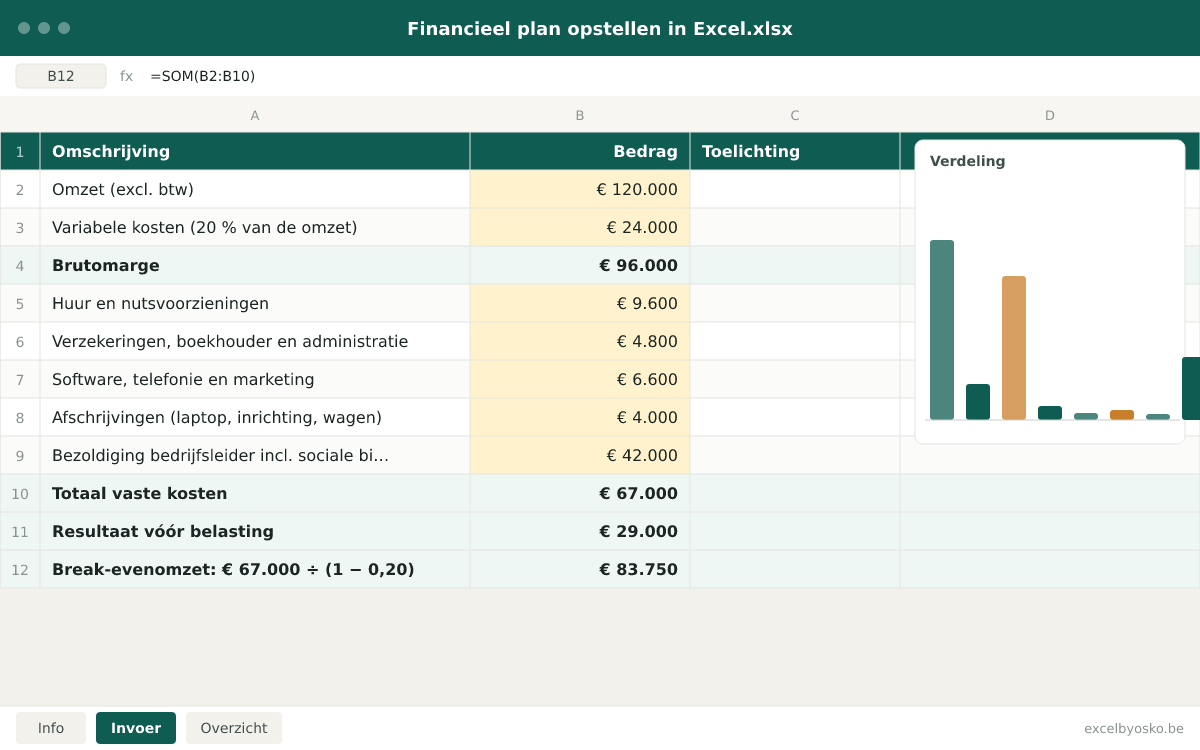
Year 1 of a starting service business in a bv, with planned revenue of €120,000 and variable costs of 20 % of revenue. The figures are rounded and serve only as an illustration.
| Revenue (excl. VAT) | €120,000 |
|---|---|
| Variable costs (20 % of revenue) | €24,000 |
| Gross margin | €96,000 |
| Rent and utilities | €9,600 |
| Insurance, accountant and administration | €4,800 |
| Software, telephony and marketing | €6,600 |
| Depreciation (laptop, fittings, car) | €4,000 |
| Director’s remuneration incl. social contributions | €42,000 |
| Total fixed costs | €67,000 |
| Result before tax | €29,000 |
| Break-even revenue: €67,000 ÷ (1 − 0.20) | €83,750 |
At €83,750 of revenue, roughly €7,000 per month, all costs including the director’s remuneration are covered. Everything above that is profit before corporate tax. Note that remuneration is the largest fixed cost: leaving it out understates the break-even revenue by more than half.
Sources & calculation method
This is how the calculation is built:
- Revenue per month = volume × price, excluding VAT. Years 2 and 3 start from year 1 with a growth percentage you enter yourself.
- Variable costs = revenue × variable cost percentage. Gross margin = revenue − variable costs. Result before tax = gross margin − fixed costs − depreciation − remuneration.
- Break-even revenue = fixed costs (including depreciation and remuneration) ÷ (1 − variable cost percentage). Per month: divided by twelve.
- Depreciation is straight-line: investment amount ÷ depreciation period in years. The loan uses a constant monthly instalment (annuity) split into principal and interest; only the interest is a cost, the full instalment is a cash outflow.
- The cashflow places receipts and payments in the month the money moves, with the payment terms of customers and suppliers and the VAT rhythm as settings. The balance sheet per year follows from the opening balance sheet, the result, depreciation, loan repayments and the changes in receivables, payables and stock.
Assumptions
- The file calculates before tax. Corporate or personal income tax depends on your situation and you enter it yourself as an estimate, together with the advance tax payments you plan for it.
- The director’s remuneration is entered as the total cost for the company, including social contributions. The file does not calculate social contributions or withholding tax.
- Growth percentages for years 2 and 3 and the payment terms of customers and suppliers are free input. The example values are indicative.
- The VAT effect in the extended version assumes the normal VAT regime with periodic returns; the exemption scheme, flat-rate scheme and mixed VAT liability are not modelled.
Limitations
- The file is a calculation model, not advice. For the incorporation of a company the notary asks for a financial plan that meets the legal content; have it reviewed by your accountant.
- The balance sheet and ratios in the extended version are simplified and do not follow every heading of the official annual accounts format of the Central Balance Sheet Office.
- Several activities, product lines or locations with their own margins need an adapted model; the basic version works with one revenue line and one variable cost percentage.
Sources
- FOD Economie – Een vennootschap met rechtspersoonlijkheid oprichten
Used for: Financial plan as a mandatory document when incorporating a bv, cv or nv, to justify the starting equity.
Accessed: September 24, 2026
- FOD Justitie (Justel) – Wetboek van vennootschappen en verenigingen, art. 5:4
Used for: Legal content of the financial plan for a bv: financing sources, opening balance sheet, projected balance sheet and income statement at 12 and 24 months, budget over at least two years.
Accessed: September 24, 2026
- Vlaanderen.be – Een vennootschap oprichten
Used for: Steps to incorporate a company, the role of the notary and the reference to the Flemish guide for writing a business plan.
Accessed: September 24, 2026
- Nationale Bank van België – Balanscentrale
Used for: Official annual accounts (balance sheet and income statement) of Belgian companies, reference for the balance sheet structure in the extended version.
Accessed: September 24, 2026
This page and the file were last updated on September 24, 2026. Legislation and rates may have changed since.
Frequently asked questions
Is a financial plan mandatory when incorporating a bv?
Yes. The Code of Companies and Associations requires the founders of a bv, and also of an nv and a cv, to hand a financial plan to the notary before incorporation. In it you justify the starting equity in the light of the planned activity over at least two years. The plan is not filed with the deed but kept by the notary. For a sole proprietorship there is no legal obligation, but the bank almost always asks for one when you apply for credit. And even without an obligation it is the best way to check before you start whether your plan holds up.
What has to be in a financial plan?
For a bv the law lists the minimum content: a precise description of the planned activity, an overview of all financing sources at incorporation, an opening balance sheet and projected balance sheets after twelve and twenty-four months, a projected income statement after twelve and twenty-four months, a budget of expected income and expenses over at least two years, and a description of the assumptions behind the revenue and profitability estimate. If an external expert helped, they are named. In practice that translates into four parts: investment budget, financing plan, operating budget and liquidity plan.
How do I estimate my revenue realistically?
Work bottom-up, not top-down. Do not start from a market share but from what you can concretely deliver: how many customers, assignments or hours per week, at what price, and how many weeks a year you actually work. Subtract holidays, illness, prospecting and administration from your available hours. Plan a ramp-up curve: in the first months you are rarely at full speed. Then compare the result with the fixed costs and your own remuneration through the break-even revenue. If you only reach it in month ten, you know how much buffer you need.
What do the bank and the notary look at?
The notary checks that the plan contains the legal elements and keeps it; the notary does not assess the figures. The bank does look at the substance: is the revenue substantiated, does the gross margin cover the fixed costs, does the cash balance stay positive after the repayments and how much own contribution stands against the credit. It compares the repayment capacity with the annual instalment of principal and interest. A plan in which revenue is at full speed in month one or in which the director’s remuneration is missing inspires little confidence. With Ready4Credit the FPS Economy offers a tool to test your credit file in advance.
Which mistakes are most common in a financial plan?
Overly optimistic revenue from the first month, without a ramp-up curve. Forgetting your own remuneration or social contributions, which makes the break-even revenue far too low. Losing sight of VAT: on an investment you pre-finance the VAT and only get it back after the return, and on your revenue you pay over VAT that was never yours. Booking investments as a cost in year 1 instead of depreciating them, or conversely forgetting the full loan repayment in the cashflow. And the one-off costs of the incorporation itself: notary, publication, rental guarantee.
Osko Consult
Need something similar for your own business?
Osko Consult helps businesses with financial planning, dashboards, Excel solutions and custom automation. From a one-off model to fully automated reporting.
Related tools
- Excel template
Cashflow forecast template in Excel
Plan your business’s incoming and outgoing cash month by month and see in advance when your balance hits its lowest point: customer receipts, suppliers, wages, VAT and loans on one sheet.
Self-employed · SMEsFree - Excel template
Sole trader or company? Compare in Excel
Compare, for the same profit, what you keep net as a sole trader and as a company, including the extra yearly costs of a company, and see from which profit level a bv starts to pay off.
Self-employedFree - Excel template
Loan comparison template in Excel
Put up to four loan offers side by side with amount, term, nominal rate, APR, monthly payment and all costs, and see at once which loan is cheapest over the whole term.
Individuals · Self-employed · SMEsFree - Excel template
Salary vs dividend comparison in Excel
Compare what is left net when your company pays out the same profit as director’s salary or as a dividend, with corporate tax, social contributions, personal income tax and withholding tax.
Self-employedFree