Cashflow forecast template in Excel
Plan your business’s incoming and outgoing cash month by month and see in advance when your balance hits its lowest point: customer receipts, suppliers, wages, VAT and loans on one sheet.
You see months ahead whether there is enough money in the bank to pay wages, VAT and suppliers, and how much buffer you have left.
- Last updated:
- Published:
Available versions
FreeChoose the version that suits you. All versions are free.
Basic
Version 1.0 · last updated September 24, 2026Twelve months ahead: opening balance, incoming and outgoing cash per category, closing balance per month and a chart.
Works with Excel 2016+, Microsoft 365, LibreOffice Calc
Download Basic (English, 9 kB)Also available in: Nederlands, Français
Extended
Version 1.0 · last updated September 24, 2026Per week for the next thirteen weeks and per month after that, VAT payments separate, three scenarios (base, cautious, optimistic) and a minimum buffer with warning.
Works with Excel 2016+, Microsoft 365, LibreOffice Calc
Download Extended (English, 9 kB)Also available in: Nederlands, Français
Professional
Version 1.0 · last updated September 24, 2026Several bank accounts, open customer and supplier invoices with expected payment date, credit line, VAT and advance tax payment calendar and forecast versus actual comparison.
Works with Excel 2016+, Microsoft 365, LibreOffice Calc
Download Professional (English, 9 kB)Also available in: Nederlands, Français
Free · No account · No email
In short
A cashflow forecast is a period-by-period overview of the money your business expects to receive and pay, starting from the opening bank balance, so you see in advance how the balance evolves and when it is at its lowest.
Profit on paper does not mean money in the bank. Customers pay after thirty days or later, VAT has to be paid on fixed dates and wages go out every month whatever comes in. This Excel puts all those flows side by side, month by month, and shows what the balance will be at the end of each month.
What does this tool do?
You enter the opening balance of your bank account and then, month by month, what you expect to receive and pay: customer receipts including VAT, suppliers, wages and social security, rent, VAT payments, loan repayments and other outgoings. The file adds up receipts, subtracts payments and carries the closing balance forward to the next month. The result is a twelve-month forecast in which you immediately see the month where the balance is lowest.
That low point is the number that matters. A business rarely fails because it makes a loss, but because at some point it can no longer pay its invoices. A profitable company that grows fast, holds a lot of stock or lets customers pay late can run out of cash. The forecast makes that risk visible while there is still time to act: negotiate a payment term, postpone an investment or apply for a credit line.
The extended version works per week for the next thirteen weeks and per month after that, keeps VAT payments on a separate line and lets you compare three scenarios: base, cautious and optimistic. The professional version adds several bank accounts, a credit line, open customer and supplier invoices with their expected payment date and a calendar of VAT and advance tax payments, plus a comparison of forecast versus actual.
Who is it for?
- Self-employed people and small SMEs who want to know whether there will still be enough money in three months for wages, VAT and suppliers.
- Businesses that are growing or investing and want to see what that does to the bank account before applying for a loan or credit line.
- Owners in seasonal sectors such as hospitality, construction or retail who need to bridge the quiet months.
- Accountants and finance managers looking for a simple, adaptable model to discuss with the owner.
What is included?
- Input sheet with the opening balance and, per month, the expected receipts and payments per category, twelve months ahead.
- Automatic calculation of net cashflow and closing balance per month, carried forward as the opening balance of the next month.
- Overview sheet with a chart of the balance per month and the lowest point highlighted.
- Weekly planning for the next thirteen weeks, a separate VAT line and three scenarios with a minimum buffer that triggers a warning (extended version).
- Several bank accounts, credit line, open invoices with expected payment date and a VAT and advance tax payment calendar (professional version).
- Forecast versus actual comparison per month, so you see where your estimates diverge (professional version).
How do you use the file?
- 1
Open the file and go to the “Input” sheet. Enter the balance of your bank account(s) on the start date as the opening balance. Only the yellow cells are meant to be filled in.
- 2
Enter the expected receipts per month, including VAT. For the first months start from open invoices and their due dates; for later months use your average turnover and usual payment term.
- 3
Enter the fixed payments: wages and social security contributions, rent, insurance, loan repayments and subscriptions. They come from your bookkeeping or bank statements and vary little from month to month.
- 4
Enter the variable payments: suppliers, stock, subcontractors and other costs, again including VAT. Put the VAT payment in the month you actually pay it: the 20th of the following month if you file monthly, the 25th of the month after the quarter if you file quarterly.
- 5
Add the one-off amounts you already know: an investment, an advance tax payment and, if you have staff, double holiday pay in May or June and the year-end bonus in December.
- 6
Look at the “Overview” sheet: the chart shows the balance per month and the lowest point. Update the file every month with the actual balances and roll the forecast forward by one month.
Worked example
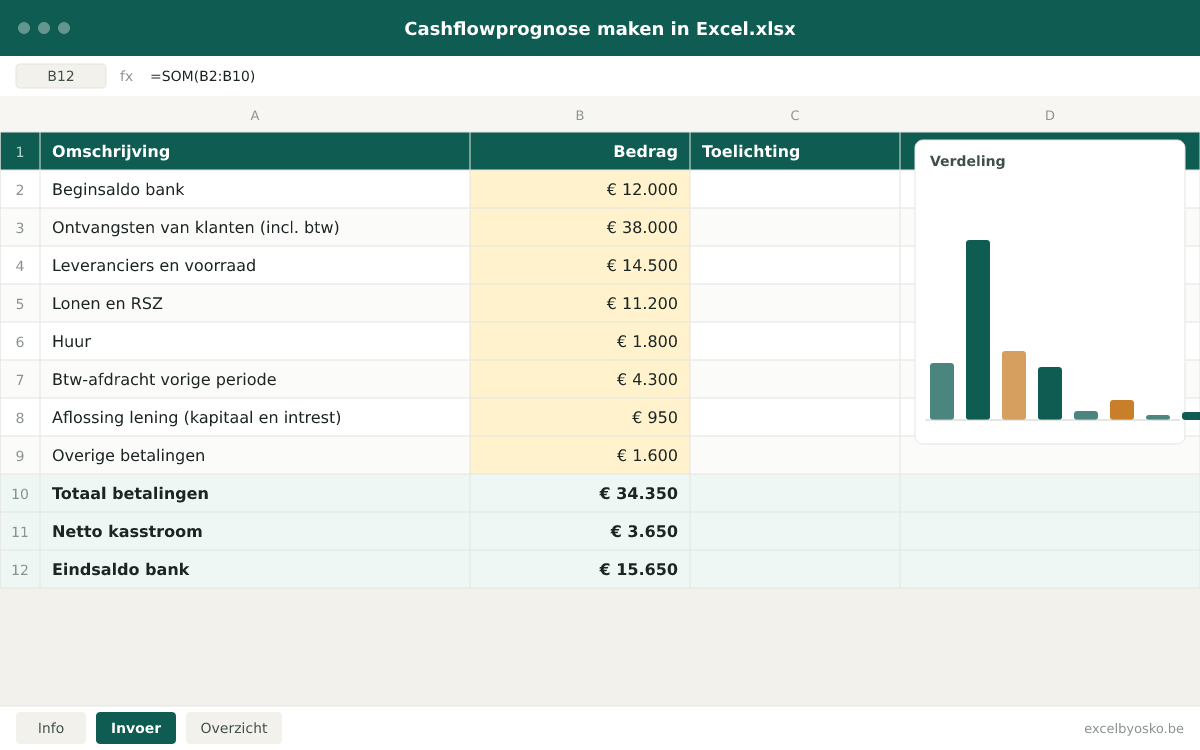
A small SME with staff, one month taken from the forecast. All amounts include VAT and are rounded; they serve only as an illustration.
| Opening bank balance | €12,000 |
|---|---|
| Receipts from customers (incl. VAT) | €38,000 |
| Suppliers and stock | €14,500 |
| Wages and social security | €11,200 |
| Rent | €1,800 |
| VAT payment for the previous period | €4,300 |
| Loan repayment (principal and interest) | €950 |
| Other payments | €1,600 |
| Total payments | €34,350 |
| Net cashflow | €3,650 |
| Closing bank balance | €15,650 |
This month €3,650 is added. If in the next month the VAT payment coincides with double holiday pay and a large customer pays late, the same business can dip below zero. That is why you look at the whole series, not at a single month.
Sources & calculation method
This is how the calculation is built:
- Closing balance of a month = opening balance + receipts − payments. The closing balance automatically becomes the opening balance of the next month, so one error in an early month carries through to every later month.
- All amounts are cash amounts including VAT and sit in the month the money actually arrives on or leaves the account, not the month of the invoice. A January invoice with a thirty-day payment term therefore sits in February.
- The VAT payment is the difference between the VAT you charge customers and the VAT you pay suppliers, placed in the month of payment according to your filing rhythm (monthly or quarterly). A VAT credit goes in as a receipt in the month the refund is paid out.
- The lowest point is the smallest closing balance in the series. The extended version compares it with a minimum buffer you choose and colours the months where you fall below it.
- The scenarios in the extended version apply percentages to receipts and variable payments (for example receipts −15 % in the cautious scenario); fixed payments such as wages, rent and loan repayments stay unchanged.
Assumptions
- Expected receipts are estimates based on open invoices and historical payment terms. The file does not know customer behaviour; if customers pay later than entered, the cash shifts to a later month.
- The VAT rhythm is a setting: monthly filers pay by the 20th of the following month, quarterly filers by the 25th of the month after the quarter. Check the VAT calendar of the FPS Finance for the exact dates, which shift when they fall on a weekend or public holiday.
- Advance tax payments are free input; the example calendar uses the quarterly dates for companies whose financial year matches the calendar year.
- Staff costs are entered as the total cash amount per month (net salary, withholding tax and social security together). The file does not calculate a wage cost from a gross salary.
Limitations
- The file is not bookkeeping and does not replace a liquidity plan drawn up by your accountant. It calculates with what you enter.
- A forecast beyond three or four months is by definition uncertain; use the distant months as a direction, not a promise.
- The basic version works with one bank account and one scenario. Credit lines, several accounts and a comparison with actuals are in the professional version.
Sources
- FOD Financiën – Periodieke btw-aangifte
Used for: Monthly VAT returns as the rule and quarterly returns under conditions; basis for the VAT rhythm in the forecast.
Accessed: September 24, 2026
- FOD Financiën – Btw-kalender
Used for: Filing and payment deadlines: the 20th of the following month for monthly filers, the 25th after the quarter for quarterly filers.
Accessed: September 24, 2026
- FOD Financiën – Voorafbetalingen vennootschapsbelasting
Used for: Quarterly dates of advance tax payments and the surcharge for insufficient payments, used in the tax calendar.
Accessed: September 24, 2026
- FOD Justitie (Justel) – Wet betreffende de bestrijding van de betalingsachterstand bij handelstransacties
Used for: Statutory payment term of 30 calendar days between businesses when nothing is agreed, with a contractual maximum of 60 days.
Accessed: September 24, 2026
This page and the file were last updated on September 24, 2026. Legislation and rates may have changed since.
Frequently asked questions
What is the difference between cashflow and profit?
Profit is the difference between income and costs in the income statement, regardless of when the money moves. Cashflow is the money that actually arrives on and leaves the account. An invoice you send in March counts as revenue in March, but the money may only arrive in May. Conversely, you pay for an investment in one go, while the cost is spread over several years through depreciation. That is why a profitable business can still run out of money, and a loss-making business can temporarily hold a lot of cash.
Why can a profitable business still run out of cash?
Because the money comes in later than the costs go out. You pay wages, rent and suppliers every month, while customers pay after thirty, sixty or more days. Growth makes it worse: more turnover means more stock and more open invoices that you pre-finance. On top come VAT payments, advance tax payments and investments, which fall on fixed dates and have nothing to do with that month’s profit. A forecast shows those peaks in advance, so you can build a buffer or make arrangements.
When do I have to pay VAT and how do I put it in the forecast?
That depends on your filing rhythm. If you file monthly, you submit the return and pay by the 20th of the following month. If you file quarterly, you do so by the 25th of the month after the quarter; quarterly advance instalments no longer exist. If that day falls on a weekend, the date shifts. Since 2026 there is also no longer a summer holiday extension for filing. In the forecast you therefore put the VAT due in the month of payment, not in the month you issued the invoices. Quarterly filers thus see a larger outflow every three months, which noticeably weighs on cash in those months.
How much buffer should I keep in my account?
There is no legal figure. A common rule of thumb is to be able to cover one to three months of fixed payments without any new receipts: wages, rent, loan repayments and insurance. Also look at your largest fixed-date outflows, such as a quarterly VAT payment or double holiday pay, and make sure you can pay them even if a large customer is a month late. The extended version lets you set a minimum buffer yourself and colours the months where the forecast falls below it.
How often should I update the cashflow forecast?
At least once a month, preferably right after closing the month. Replace the forecast of the past month with the actual balances, look at where the difference comes from and adjust the following months. In busy or difficult periods a weekly update of the next thirteen weeks is more useful: you then track week by week which invoices have been paid and which payments are coming. A forecast that is not updated loses its value within a few weeks.
Osko Consult
Want this overview to update itself?
Osko Consult connects your cashflow overview to your accounting or bank data, so it updates itself instead of you. With a dashboard that is right every morning.
Related tools
- Excel template
Financial plan template in Excel
Draw up a three-year financial plan: revenue, costs, result, cashflow and break-even revenue, with investments, financing and a balance sheet per year in the extended version.
Self-employed · SMEsFree - Excel template
Loan comparison template in Excel
Put up to four loan offers side by side with amount, term, nominal rate, APR, monthly payment and all costs, and see at once which loan is cheapest over the whole term.
Individuals · Self-employed · SMEsFree - Excel template
Salary vs dividend comparison in Excel
Compare what is left net when your company pays out the same profit as director’s salary or as a dividend, with corporate tax, social contributions, personal income tax and withholding tax.
Self-employedFree